How to pack a laptop and other electronics for shipping
The charger is often the hardest item in a laptop box. Keep it apart from the computer and choose supports that hold the device without putting pressure on the screen.
Go to the packing steps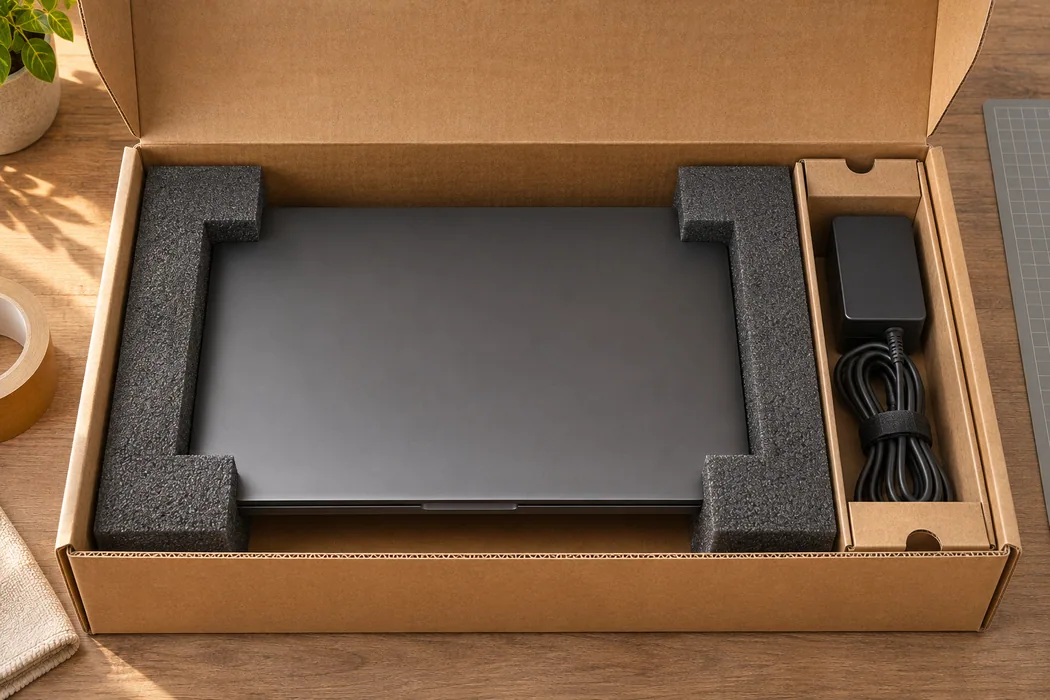
How to pack your parcel
Prepare the device
Back up any data you need, shut down the device completely and disconnect the cables. Put adapters and the power supply in a small box that you can secure separately.
Identify retail and shipping packaging
Look at the box in which the device arrived. A glossy retail carton originally delivered inside a sturdy outer box may have very little corner clearance. Keep the outer carton and all the inserts if they are available. Photograph the arrangement before assembling it again.
Check the inserts
If you have the original packaging, check that the moulded supports are complete and undamaged. Set the device on the intended contact points and check the corners are held away from the outer walls.
Protect the most exposed part of your model
On a laptop, close the display and check the supports cradle the chassis. For a monitor with a removable stand, follow the manufacturer's instructions and pack the stand in its own compartment. Put screws and adapters in a closed pouch inside that compartment.
Secure the accessories
Place the accessory box in its own compartment or behind a divider. With the outer box still open, check that plugs, connectors and the power supply cannot slide onto the device.
Choose the outer box
If the original carton is display packaging, place it in a shipping box with cushioning on all sides. The lid must close without pressing on the screen.
Worked example: a laptop with its charger and mouse
Place the closed laptop in the two shaped end supports and check from above that the corners sit clear of the box walls. Coil the cable loosely. Pack the mouse, power adapter and cable in the accessory box, close it and secure it in the accessory compartment.
If the accessory box slides over the computer as you bring the flaps together, move it to a side compartment or choose an outer box with room for two separate packages. An open-box photograph makes the load paths and pressure points easier to see.
Checks before sealing
- Check that no plug or cable end touches the chassis and the lid rests on the box rim. Nothing heavy should rest on the back of the display.
- For several devices, label the accessory boxes and keep a list of which box goes with each device. Record the model and the finished parcel dimensions for your quote.
Troubleshooting
Only have a soft laptop sleeve? Use it to protect the finish, then add fitted supports and a rigid box. If there is a gap beside a hinge or corner, send us a photograph so we can advise on the supports.